
Home / Blog / Exit Intent Mobile
Exit intent on mobile: signals that replace the mouse
Exit intent works on mobile, but not by tracking a cursor: phones have none. Mobile exit campaigns read behavior signals instead (back-navigation attempts, fast upward scrolls, tab switches, pauses), and they convert when those signals are combined and frequency-capped. Here is what each signal is worth, how to set them up, and how to tell whether they earn their place.
Key takeaway: there is no cursor to track on a phone, so combine two disengagement signals (for example fast upward scroll plus 20 seconds on page), show the popup once per visitor, and judge the campaign on signups per thousand mobile sessions, not on impressions.
The short answer
- Why desktop exit intent fails on phones: the classic trigger watches the cursor rushing toward the tab bar. Touchscreens have no cursor, so that event never fires. Any tool that promises "exit intent" on mobile without explaining its signals is really selling a timed popup.
- What replaces it: five behavior signals (back navigation, fast upward scroll, tab switch, inactivity pause, scroll depth plus time) that hint the visitor is disengaging. None of them proves an exit on its own.
- When it pays: when you combine at least two signals, cap frequency to once per visitor, and keep the popup small and dismissible. Then measure signups per mobile session against a plain timed popup.
New to the desktop version? Start with our exit-intent popup guide: it explains the trigger logic, the offers that convert, and the mistakes that kill conversion. Stores should also read exit-intent cart recovery, which matches the offer to the abandonment reason.
The five mobile exit signals, compared
Every mobile "exit intent" product is a bundle of the signals below. Knowing what each one actually detects keeps you from paying for a fancy label on a timer.
| Signal | What it detects | Strength | Weakness |
|---|---|---|---|
| Back navigation attempt | Back button or back gesture, the closest thing to leaving | Highest intent: the visitor asked to go somewhere else | Browsers restrict interception, and on iOS it rarely fires in time |
| Fast upward scroll | A quick swipe toward the top, often to reach the address bar | Easy to detect and fires before the exit | Also fires when readers jump back to re-read a section |
| Tab switch or app switch | The page losing visibility while the visitor checks something else | Catches comparison shoppers mid-research | Fires after the fact, so the popup waits for their return |
| Inactivity pause | No touch or scroll for a set number of seconds | Good for long articles and configurators | Confuses slow reading with leaving on content pages |
| Scroll depth plus time | Reached a section and stayed a minimum time, then stalled | Filters out bouncers who never engaged | It is engagement targeting, not exit detection, so name it honestly |
Build it in GrowthTools in four steps
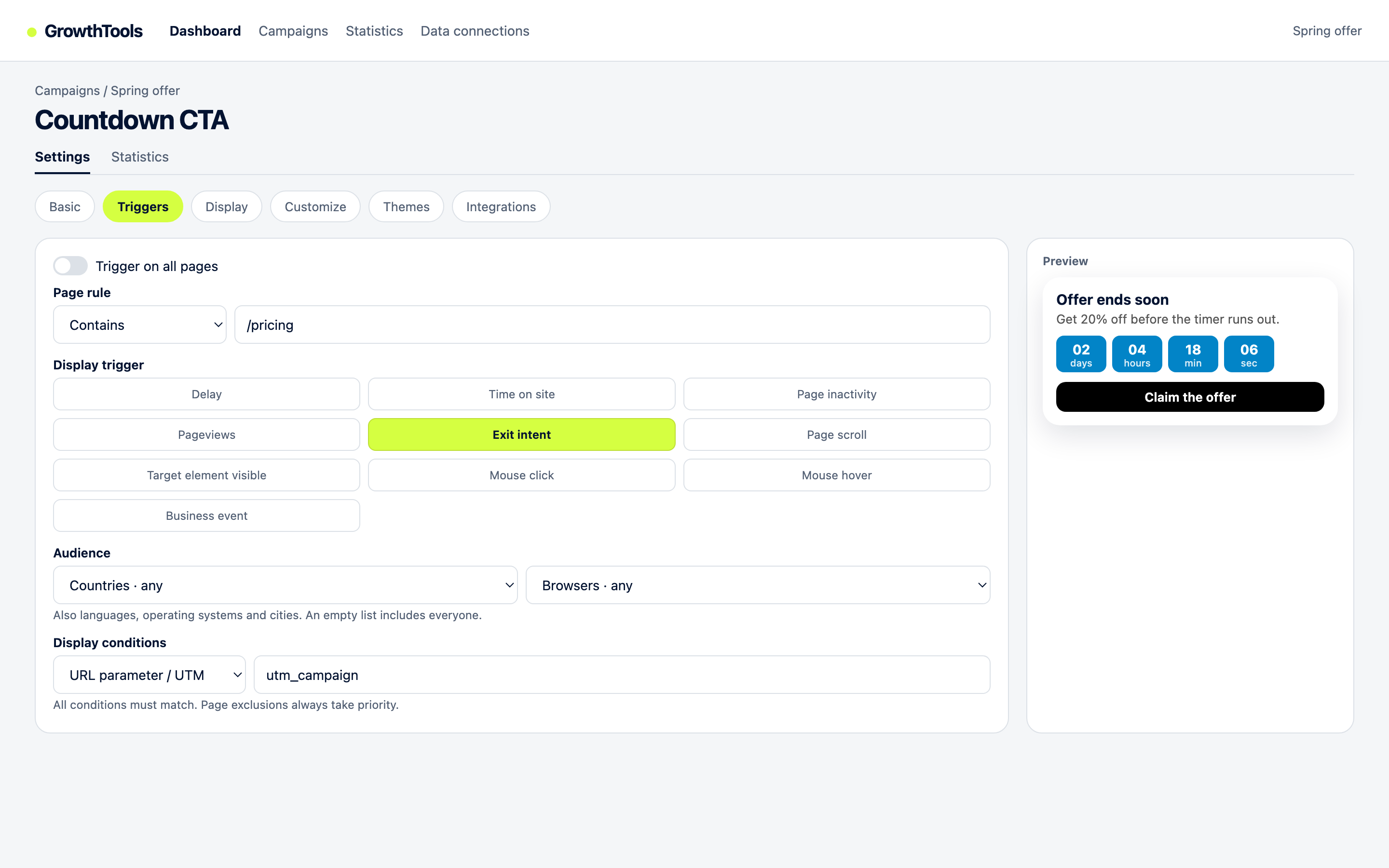
- Pick a signal pair in the Triggers tab. Create a popup campaign, open Triggers, and combine exit intent with a second condition such as time on page or scroll depth. The pair is the whole trick: one signal guesses, two signals qualify.
- Scope it to mobile and to the right pages. Add a device condition for phones plus a page rule (product, pricing, or cart pages), so desktop visitors keep the cursor-based trigger and casual blog readers never see the popup. Our Core Web Vitals guide explains why a deferred script matters here: the trigger logic must not slow the page it watches.
- Design small and dismissible. Use a compact popup with a visible close control, never a full-screen takeover on load. A delayed, dismissible popup shown after a real signal stays clear of the problems described in our mobile interstitial penalty guide.
- Cap frequency and measure. Show the campaign once per visitor per session at most, then compare signups per thousand mobile sessions with the campaign on and off. If the exit version beats a plain timed popup without hurting pages per session, keep it.
Recover mobile visitors before they bounce.
GrowthTools combines exit, scroll, timing, and page rules in one trigger panel, with frequency caps and a deferred script built in.
Create your free accountHow to know it works
Run the campaign for two comparable weeks, then read three numbers together: signups per thousand mobile sessions, pages per session, and checkout starts if you sell online. Three outcomes tell you what to do next. If signups climb while pages per session hold steady, the signals are catching real near-exits: keep the setup and test a stronger offer. If signups climb but engagement drops, the popup interrupts too early: tighten the time-on-page condition or drop the weakest signal. If nothing moves, the signals fire on the wrong audience: narrow the page rules before redesigning the creative.
Browse the full range on the GrowthTools widget catalog: more than 50 widgets behind a single deferred script.
Honest limits
Mobile exit detection is estimation, not detection. Browsers give pages very little warning before a tab closes, and iOS Safari in particular rarely lets a script react to a back gesture in time: plan for the back-navigation signal to miss on iPhones and let the scroll and timing signals carry those visitors. Tab-switch detection fires after the visitor already left, so design that variant as a "welcome back" message rather than a last-second rescue. And never relabel an immediate popup as exit intent: visitors sense the trick, close rates climb, and you lose the trust that makes the real signal pairs work.
Questions
It works, but not by tracking a cursor, since phones have none. Mobile exit campaigns rely on behavior signals instead: back-navigation attempts, fast upward scrolls, tab switches, inactivity pauses, and scroll depth combined with time on page. Treat these as strong hints of disengagement rather than certain proof that the visitor is leaving, and pair them with frequency caps so they stay welcome.
The five useful signals are back-button or back-gesture attempts, a fast upward scroll toward the address bar, switching tabs or apps, a pause after active reading, and reaching a scroll depth after a minimum time on page. No single signal is reliable on its own, so the best setups combine two: for example, fast upward scroll plus at least 20 seconds on page, so casual scrollers never see the popup.
It can if it covers the main content right after the page loads, which is exactly what Google's intrusive interstitial guidance targets. A small popup that appears after a genuine disengagement signal, is easy to dismiss, and never shows on the first seconds of a visit stays clear of that problem. Read our mobile interstitial penalty guide for the exact rules, then keep exit campaigns delayed, dismissible, and frequency-capped.
Compare signups per mobile session with the campaign on and off over comparable weeks, or run two triggers against each other, for example exit signals versus a plain timed popup. If the exit version collects more emails per thousand mobile sessions without hurting pages per session, it earns its place. If nothing moves, the signals are firing on the wrong audience: tighten the page rules and the time-on-page condition before redesigning the offer.
Test a mobile exit signal pair this week.
One site, real campaigns, no card. Combine two signals, cap frequency, and compare signups per session.
Create your free accountPublisher: GrowthTools by Seinsights. Product demonstrations are illustrative; results depend on your site and campaign.