
Home / Blog / Exit intent cart recovery
Exit intent cart recovery: win back shoppers before they go
An exit-intent cart recovery popup appears when a shopper with items in the cart is about to leave, and shows one last relevant offer. The trick is matching the offer to the reason they leave: shipping costs, coupon hunting, or simple distraction. Here is how to set the triggers, pick the offer, and write the popup so it recovers sales instead of training bargain hunters.
Key takeaway: show the popup only to shoppers with items in the cart, match the offer to the abandonment reason, reserve discounts for higher cart values, and capture the email first so you can follow up even if they leave.
Why shoppers abandon at the last step
Most carts are not abandoned out of dislike for the product. The shopper already chose it. Three reasons explain almost every late exit. First, the price jumps at checkout: shipping, taxes, or fees appear that were invisible on the product page. Second, the coupon hunt: the shopper sees an empty promo code field, opens a new tab to search for a code, and never comes back. Third, plain distraction: a message, a meeting, or a second thoughts pause, and the tab stays open until the session dies.
A generic exit popup treats all three the same and usually answers with a flat 10 percent off. That works on some visitors and teaches the rest to abandon on purpose next time. A recovery flow does better: one trigger, but an offer fitted to the reason. If you are new to the trigger itself, start with our general exit-intent popup guide, then come back here for the store specific setup.
Match the offer to the reason
| Abandonment reason | Signal to watch | Offer that fits |
|---|---|---|
| Shipping or fee surprise | Exit on the cart or checkout page | Free or reduced shipping, stated plainly with the threshold |
| Coupon hunting | Exit with the checkout promo field in view, or long pause on the payment step | A small code revealed after the email capture, no search needed |
| Distraction or hesitation | Exit from product or cart pages, low cart value, first visit | Save-my-cart email with the items listed, plus reassurance (returns, guarantee) |
Note what is missing from the table: a big discount for everyone. Keep the percentage small and tied to a cart value floor, and let social proof notifications do the trust work on the product pages before the popup ever appears.
Set the triggers and rules
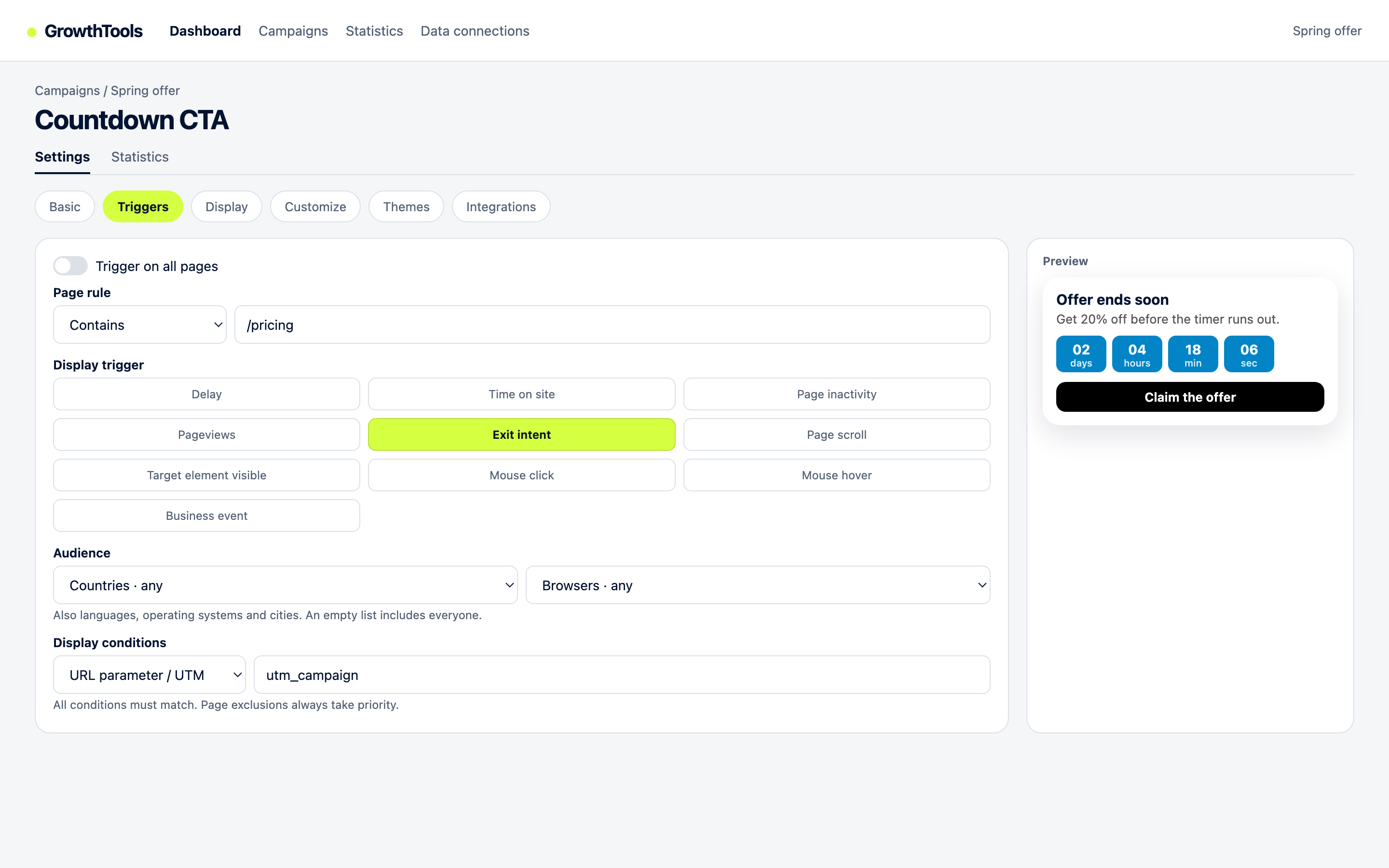
1. Trigger on exit intent, only where it counts
Limit the popup to cart, checkout, and product pages. On desktop the exit signal is the cursor moving toward the tab bar; on mobile use the replacements: fast upward scroll, back button press, tab switch, or a long idle pause. Never fire it on order confirmation or thank you pages.
2. Add a cart value condition
Show the popup only when the cart holds something: a cart value above zero at minimum, and ideally two tiers. Shoppers above your average order value see the discount version; shoppers below it see the shipping or reminder version. This single rule protects your margin more than any copy tweak.
3. Exclude people who already converted
Suppress the popup for visitors who already signed up or completed a purchase in this session. Nothing burns trust faster than a discount popup shown to someone who just paid full price.
4. Cap the frequency
Once per day per visitor is the sane default, once per session if your traffic is mostly returning buyers. A recovery popup that reappears on every page view stops being a rescue and starts being the reason people leave.
Browse the formats that fit this flow in the GrowthTools catalog: coupon popups, countdown collectors, and email bars all run from the same deferred script.
Recover your first cart this week.
Free plan available, no card required. One script, exit trigger plus cart rules, live in an afternoon.
Create your free accountWhat to show in the popup itself
- Capture the email first. Ask for the address on step one, reveal the code or the saved cart on step two. Even if the shopper leaves anyway, you can follow up by email.
- Name the items. A line like "Your trail shoes are still in your cart" beats a generic "Wait, do not go" every time.
- Keep the copy short. One headline with the offer, one line of reassurance (free returns, secure checkout), one button. Long popups get dismissed, not read.
- Add urgency sparingly. A countdown timer fits a same-session discount, but never fake it: a timer that resets on reload teaches visitors your offers mean nothing.
Pair the popup with a quiet reminder: a small bar that keeps the code visible if the shopper stays, so the offer survives even when the popup is closed. Our lead capture guide shows which bar and modal formats combine well without stacking scripts.
Mistakes that kill recovery flows
- Discounting every exit. Flat codes for all visitors train repeat abandonment. Tier by cart value instead.
- Firing before the cart exists. An exit popup on the homepage offering a cart discount confuses browsers who never shopped.
- Hiding the real problem. If shipping costs cause most exits, a 5 percent code will not fix it. Show the shipping offer, or better, show shipping earlier on the product page.
- Skipping mobile. Test the flow on a real phone: bottom sheets and compact bars convert, full-screen takeovers get dismissed fast.
Questions
It is a popup that appears when a shopper with items in the cart shows exit signals, such as moving the cursor toward the tab bar on desktop or scrolling up fast on mobile. It shows one last relevant offer, usually free shipping, a discount, or a save-for-later email, before the visitor leaves.
There is no universal winner. Free or discounted shipping works best when delivery costs surprise shoppers at checkout, a small discount works when visitors leave to hunt for coupon codes, and a save-my-cart email works for distracted browsers. Match the offer to the reason, and test one change at a time.
No. Reserve discounts for higher cart values and show a cheaper incentive, such as free shipping or a reminder, to smaller carts. That protects your margin and stops bargain hunters from gaming the popup on every visit.
Create a campaign, pick a coupon or email collector widget, set the trigger to exit intent, add a cart value condition so it only shows to shoppers with items in the cart, exclude visitors who already signed up, and cap display to once per day. Publish and check impressions in the dashboard statistics.
Your carts are leaving anyway. Catch them.
Start free, no card required. Exit trigger plus cart rules, live this afternoon.
Create your free accountPublisher: GrowthTools by Seinsights. Product demonstrations are illustrative; results depend on your site and campaign.